Prepare the Inventory File
Before deploying the CMP Converged Monetisation Platform. The MDS Global product that supports customer care and billing for digital service providers. components, you must prepare an inventory file that lists the CMP hosts and describes the target state of the deployment. The CMP installation repository includes a template for an inventory file that you can copy and then edit by supplying the hostnames of the CMP hosts and values for variables that set the properties for the hosts. See CMP Inventory Template for more information.
In order to install the highly available CMP stack (either fully or partially), more than one host must be specified for a component that requires high availability. Make sure that hosts listed in the JBoss An open-source, cross-platform Java application server developed by JBoss, a division of Red Hat Inc. JBoss AS is an open-source implementation of Java 2 Enterprise Edition (J2EE) that is used for implementing Java applications and other web-based applications and software. JBoss is an open source alternative to commercial offerings from IBM WebSphere and SAP NetWeaver. and JWS groups in the inventory match the hosts of all the components that are deployed to these application servers.
About the Inventory File
An inventory file is a text file in the YAML format that has the structure as shown in the following example excerpt:
---
all:
vars:
company_name: MODEL
branding_code: MODEL
children:
rolext:
hosts:
server.example.demo.com:
vars:
# Role extender server port
server_port: 8081
# Should use HTTPS listener
use_ssl: false
# Name of the WSO2 is user that can validate token
introspect_username: introspect
# Above user's password
introspect_password: password
Important
Each section and each parameter in the inventory file MUST have the correct indentation. Use only spaces to create indentations - tabs are not allowed.
Rather than preparing the inventory file manually, you can use the CMP Installation Configuration tool. See Installation Configuration Tool.
There are two global sections under the root of the inventory file (all):
-
vars, which defines the global variables that can be accessed by all hosts used for deployment. -
children, which are groups of hosts grouped by function or role, such as a database server or an AgentView The graphical user interface of the CMP that is typically used by Customer Service Agents to access CMP customer and billing data. In versions prior to CMP 8.0, this was called the CMP GUI. client. Variables defined under a group In the Customer Manager Platform hierarchy, the highest level of the structure. The group level can be used to group corporates. Groups can hold financial information. are only accessible by the hosts in the group.Variables defined in the inventory file are visible within the scope where they are defined. Global variables, defined under
all, can be accessed by any host in any group. Group variables are defined within a group and their scope is the hosts within that group, for example the variables forjbossin the example above.
The CMP inventory file contains a number of host groups as described in the CMP Groups table. Details of all the properties that can be defined for each can be viewed by clicking on the group name. All the global variables that can be defined are described in CMP Global Properties.
| CMP Groups | |
|---|---|
|
Description |
|
|
Database server. Currently, the deployment playbook supports only single database server deployments. |
|
|
Identity server. CMP uses WSO2 Identity Server for this purpose. |
|
|
Role extender application. |
|
|
JBoss server instances. Required for aview_iface, pil, soap and configuration_centre groups. |
|
|
JBoss Web Server instances. Required for agent_view group. |
|
|
Agent View Interfaces Layer. If the host is listed in this group it must also be listed in the jboss group. |
|
|
pil |
Published Interfaces Layer application. |
|
soap |
SOAP Web Services application. |
|
REST Web Services application. |
|
|
agent_view |
Agent View application instances. |
|
SABRE Server application instances. |
|
|
Administration Console application instances. |
|
|
configuration_centre |
CMP Business Configuration. |
| pentaho | The Report Server is an instance of a Pentaho server. |
| bulk_action_console | The Bulk Action console application instances. |
Important
Two groups in the inventory file - jboss and jws - define the underlying platform rather than CMP itself. They are set up separately so that the applications that are hosted on the platform can be deployed to the different physical servers.
Any hosts, used in the following application groups must be listed in the jboss group as well:
- aview_iface
- pil
- soap
- configuration_centre
Also, any hosts used in the following application groups must be also listed in the jws group:
- agent_view
The detailed information about all permissible properties in the inventory file is for use only for an advanced installation. These properties should be changed only by experienced users who understand the consequences or following direction by MDS Global support. A CMP installation usually requires only the placeholders in the inventory file to be replaced as described in CMP Inventory Template and no other values to be changed.
CMP Inventory Template
CMP provides an inventory template file, template.yaml, which you can copy and edit to suit your CMP deployment environment. It can be adapted to both single host and multiple host environments.
The template inventory file includes placeholders for the property values, placed between angle brackets < > as follows:
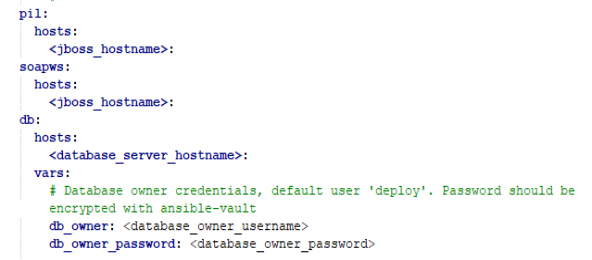
Section of the CMP inventory template file showing placeholders
To prepare the inventory template:
- Locate
template.yamlin theexamplesdirectory in the unzipped playbook directory that was downloaded as part of the pre-installation steps. Copy the file and open the copy in your editor of choice. - Complete the inventory file by providing values for the placeholders. See the table Template Placeholders for information.
-
If you want to encrypt sensitive information such as keys and passwords, follow the instructions for encrypting single properties in Encrypt Sensitive Inputs in the Inventory File.
-
Properties in the template that do NOT have placeholder values have default values provided, for example default port numbers. Some properties may be commented out. You can amend these properties. For more information, see the properties tables below.
Amending properties may have unintended consequences. Only persons experienced in CMP and your particular deployment should do so. If in doubt, please contact MDS Global.
-
If CMP is deployed to a single host, the following parameters should be set to the same value, which is the name of the target host:
- database_server_hostname
- jboss_hostname
- wso2is_hostname
- role_extender_hostname
- jws_hostname
- sabre_console_hostname
- sabre_server_hostname
- restws_hostname
- pentaho_hostname
- bulk_action_console_hostname
Important
When developing the inventory file, be aware that the same port number must not be used for more than one service on a single target host. If the same port is used, deployment may not detect it correctly. As a result, deployment will complete successfully but the application will not be installed correctly.
If two or more components that can use the same default ports are to be installed onto the same target host, the port of one these components must be modified to avoid potential port conflict.
The template placeholders that must be replaced for an installation are listed and described in the following table:
Note 1: As described in Internal TLS Certificates, self-signed SSL certificates are generated unless provided. If trusted 'real' certificates are to be used, the ssl_certificate property specified in SSL Certificates must be completed.
Note 2: All the database usernames defined above are created in the database by the installation and the components against which they are specified are then configured by the installation to use the username in question. The passwords defined against these usernames are therefore internal to the CMP application and do not need to be known by users of the application.
Note 3: When setting properties for the db (database) group, consider what is best to set for the db_data_population property for your deployment. For more information, see a description of the property options in Database Properties.